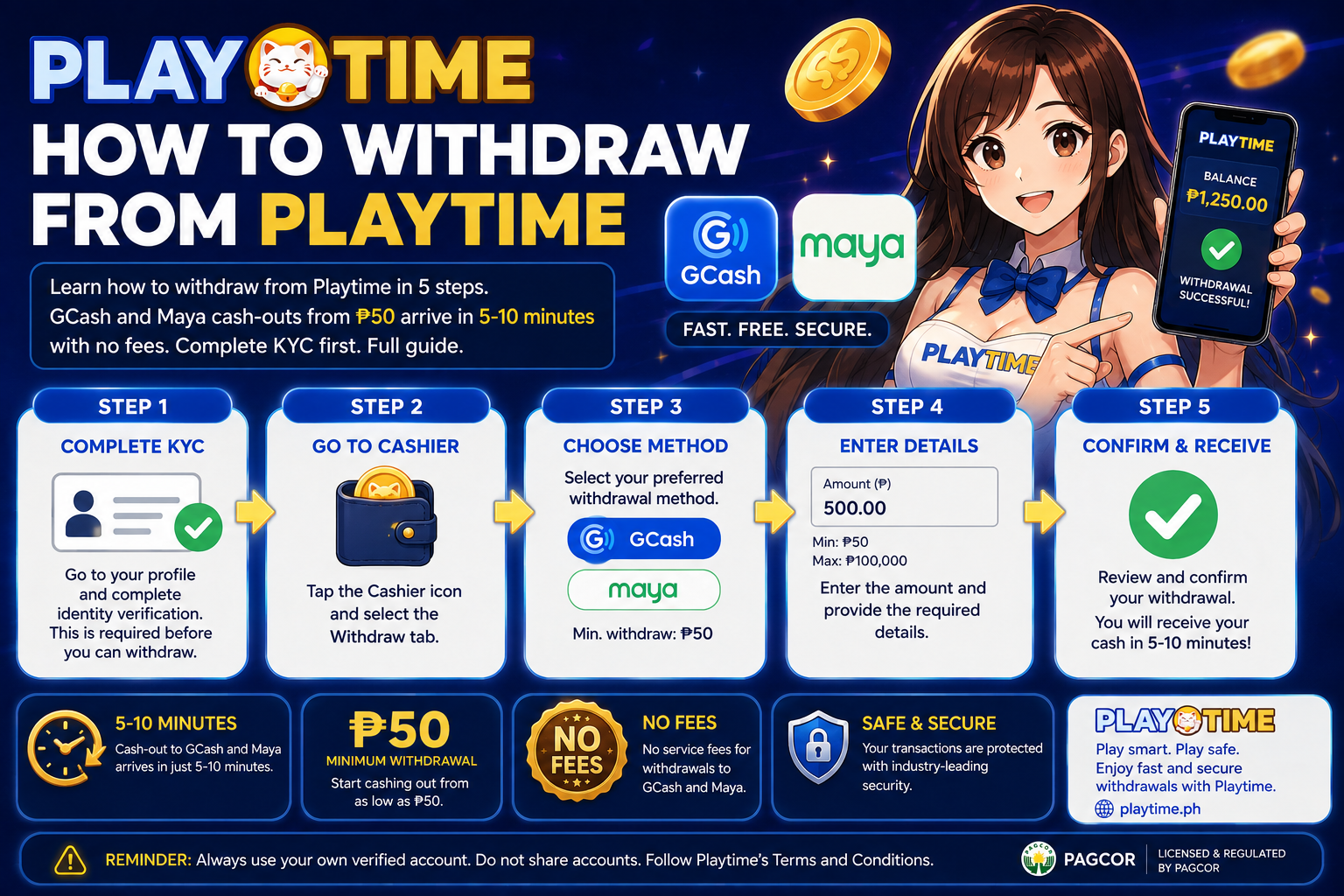
To withdraw from PT Gaming, open the Cashier, tap Withdraw, choose your verified GCash or Maya wallet, enter at least ₱50 (₱200 on the web version), and confirm. Most GCash and Maya cash-outs arrive within 5–10 minutes with no fees, once your account is KYC-verified and the wallet name matches your account. (Verified August 2026.)
What do you need before you withdraw from PT Gaming?
Four things decide whether your first cash-out goes through. Sort them before you open the Cashier and most rejected-withdrawal problems never happen.
| Requirement | What it means |
|---|---|
| Verified account (KYC) | Confirm your identity before your first withdrawal with a valid government ID (driver’s licence, passport or national ID), your legal name and date of birth. PT Gaming operates under a PAGCOR (the Philippine Amusement and Gaming Corporation, the country’s gambling regulator) licence, so verification is mandatory. Most checks finish within 24 hours. |
| Matching e-wallet name | Your GCash or Maya account must use the same full name as your PT Gaming account. A mismatch is the most common reason a payout fails. |
| Cleared turnover | For each deposit you must wager the amount at least once (1× turnover), and any bonus winnings must meet their playthrough, before the balance can be withdrawn. |
| Method & amount | Use a verified GCash or Maya wallet, or a bank transfer. Minimum: ₱50 in the app, ₱200 on the web version, ₱5,000 for bank. Standard GCash/Maya cash-outs are for amounts under ₱50,000 per transaction. |
How do you withdraw from PT Gaming, step by step?
Step 1 — Complete KYC verification
Finish account verification first: upload a valid government ID with your legal name and date of birth, then wait for confirmation (usually within 24 hours). If you have not signed up yet, follow the PT Gaming sign-up steps first.
Step 2 — Log in and open the Cashier
Log in, then open the Cashier (sometimes labelled Wallet or Banking). You will see your withdrawable balance alongside the Deposit and Withdraw options.
Step 3 — Select Withdraw and choose GCash or Maya
Tap Withdraw and pick your payout method. Choose the verified GCash or Maya wallet that matches your account name. If you deposited with GCash, see the GCash on PT Gaming guide for how the same wallet is used both ways.
Step 4 — Enter your withdrawal amount
Enter an amount within the limits shown — at least ₱50 in the app (₱200 on web). PT Gaming covers the transfer fee, so the amount you enter is the amount you receive.
Step 5 — Confirm and track the payout
Review the details and confirm. Standard GCash and Maya requests are usually completed in 5–10 minutes; follow the status in your transaction history until the funds land.
How long does a PT Gaming withdrawal take and what does it cost?
Most GCash and Maya cash-outs are processed within 5–10 minutes, and PT Gaming covers all withdrawal fees. Amounts of ₱50,000 or more go through a security review that can take 24 hours to 2–3 banking days. A withdrawal only starts once your KYC and turnover are cleared.
| Method | Amount | Typical speed | Fee |
|---|---|---|---|
| GCash / Maya | ₱50 min (app) / ₱200 (web), under ₱50,000 | 5–10 minutes | ₱0 (covered) |
| GCash / Maya (large) | ₱50,000 and above | 24 hours – 2–3 banking days | ₱0 (covered) |
| Bank transfer | ₱5,000 min, up to ₱2,000,000 / transaction | Slower than e-wallets | ₱0 (covered) |
What if your PT Gaming withdrawal fails?
Most failed withdrawals come down to five fixable causes. Match the symptom to the fix below before you contact support.
Your e-wallet name doesn’t match your account
GCash or Maya rejects a payout when the wallet name differs from your PT Gaming account name. Use an e-wallet registered in your own legal name, and make sure your PT Gaming profile uses that exact name.
Your account isn’t fully verified
If KYC is incomplete, the Cashier blocks withdrawals. Finish every verification step and wait for confirmation, then try the request again.
Your turnover or bonus wagering isn’t cleared
Each deposit needs a 1× turnover, and bonus funds stay locked until their playthrough is met. Check the wagering progress — see the no-deposit signup bonus guide for how wagering works — before you request a cash-out.
You’ve hit a limit or have a pending request
A pending request or a per-transaction cap stops new withdrawals. Standard GCash/Maya cash-outs stay under ₱50,000; split larger amounts or wait for the current request to finish.
Your wallet details are wrong or inactive
An inactive or mistyped wallet number causes a failed transfer. Re-check the number, confirm the wallet is active, and keep your payout details up to date.
Pro tips for faster PT Gaming withdrawals
- Verify your account the day you register, not the day you want to cash out.
- Keep your PT Gaming name and your GCash or Maya name identical.
- Keep single cash-outs under ₱50,000 to stay in the 5–10 minute lane.
- Clear your deposit turnover and any bonus wagering before you request a payout.
- Keep one withdrawal request active at a time.
- If a payout stalls, contact support with your transaction reference number.
New to the app? The PT Gaming app guide shows where the Cashier sits on mobile.
FAQs about PT Gaming withdrawals
How long does a PT Gaming withdrawal take?
Most GCash and Maya withdrawals are completed within 5–10 minutes, with no fees. Amounts of ₱50,000 or more go through a security review that can take 24 hours to 2–3 banking days. A request only starts after KYC and turnover are cleared.
What is the minimum withdrawal on PT Gaming?
The minimum is ₱50 through the PT Gaming app and ₱200 on the web version for GCash and Maya. Bank transfers start at ₱5,000. PT Gaming covers the transfer fee, so you receive the full amount.
Do I need to meet a turnover before withdrawing?
Yes. For every deposit you must wager the amount at least once (1× turnover), and any bonus winnings must meet their playthrough, before the balance becomes withdrawable.
Why was my PT Gaming withdrawal rejected?
The most common reasons are an e-wallet name that does not match your account, incomplete KYC verification, or turnover that has not been cleared. Fix the specific issue, then submit the request again.
Can I withdraw without completing KYC?
No. Verification is required before your first withdrawal because PT Gaming operates under a PAGCOR licence. Complete KYC first, then cash out.
Last verified: August 2026. Withdrawal limits, fees and processing times are set by PT Gaming and can change; always confirm the current figures in your Cashier.