Depositing at PT Gaming generally involves signing in to your account, opening the official cashier, choosing an available payment method, entering an amount, and completing the payment instructions shown on screen.

Payment methods, limits, processing times, and verification requirements can change. Before depositing, always check the live information in your PT Gaming account. Do not rely only on promotions, social-media posts, or old screenshots.
Quick Checklist Before You Deposit
Before starting, confirm that:
- You are using the official
ptgaming.phwebsite. - You are logged in to your own PT Gaming account.
- Your chosen payment method is currently shown in the official cashier.
- You understand the displayed minimum and maximum deposit limits.
- Your payment account has enough available balance.
- Your device has a stable internet connection.
- You have set a spending limit that you can afford.
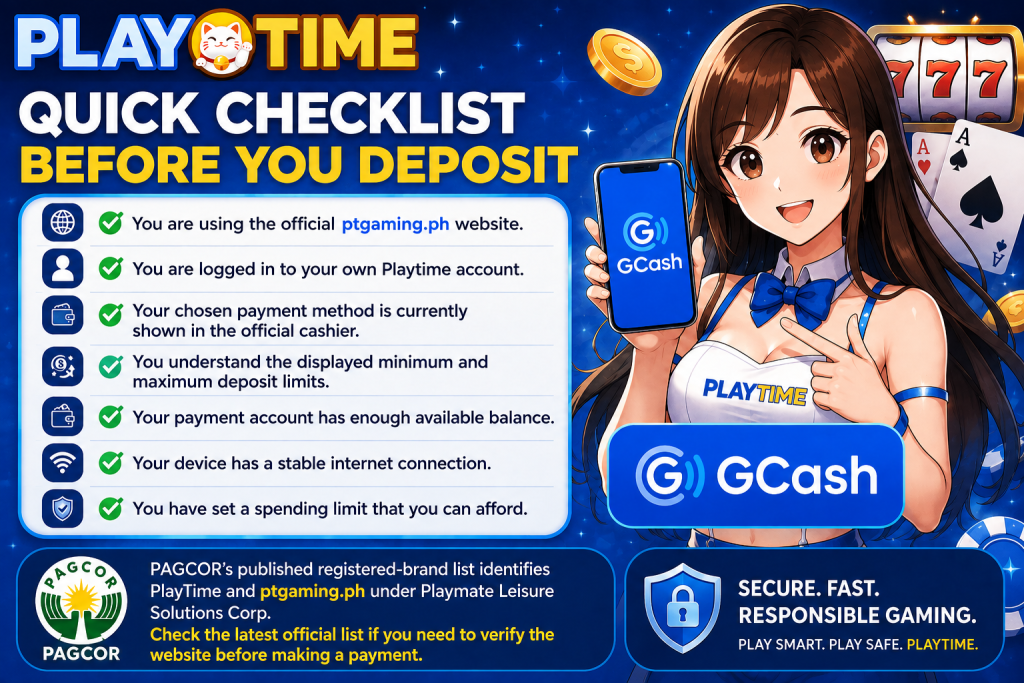
PAGCOR’s published registered-brand list identifies PT Gaming and ptgaming.ph under Playmate Leisure Solutions Corp. Check the latest official list if you need to verify the website before making a payment.
How to Deposit at PT Gaming
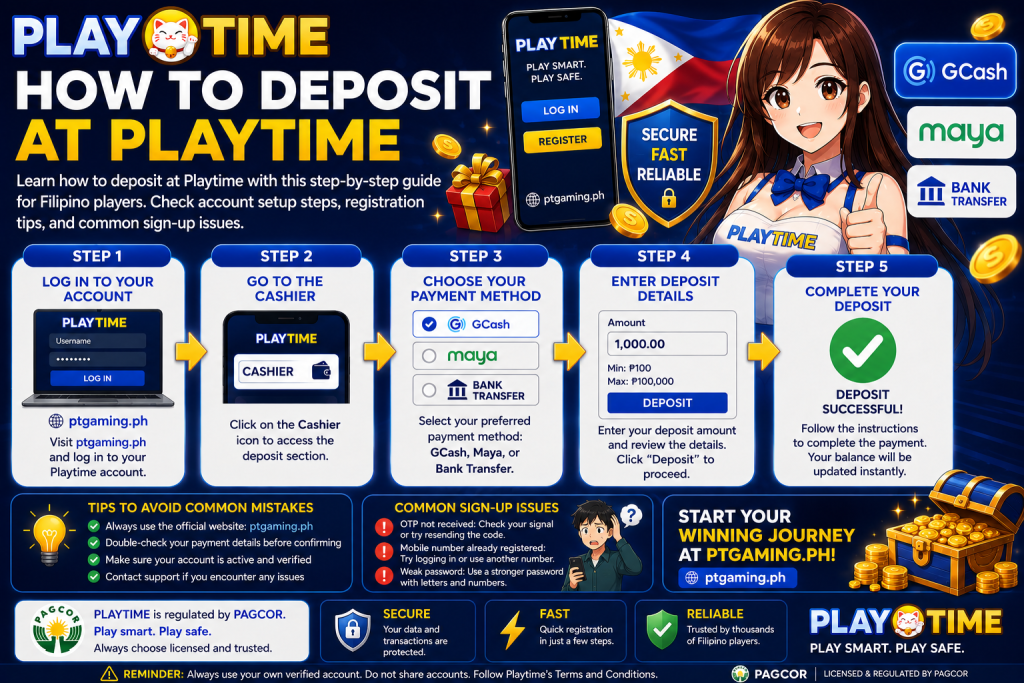
Step 1: Sign in through the official website
Open ptgaming.ph and sign in with your account credentials. Avoid using payment links sent through unknown messages, unofficial agents, or unfamiliar social-media accounts.
If you do not have an account, complete registration before accessing the cashier.
Step 2: Open the Deposit or Cashier section
From your account dashboard, select Deposit, Wallet, or Cashier. The exact label and location can vary by device or platform update.
Take a moment to check that you are viewing your own account before continuing.
Step 3: Review the available payment methods
The cashier shows the payment options currently available to your account. Select a method only if it appears on this official page.
Depending on current availability, the options may include a digital wallet, online banking, or another supported channel. Do not assume a payment option is available because it appeared on a previous visit.
Step 4: Enter the deposit amount
Enter the amount you want to deposit. Before continuing, review:
- Minimum and maximum limits shown on screen
- Any stated fees
- The amount entered
- The payment method selected
Deposit only an amount that fits your personal entertainment budget. Online gaming should not be treated as a way to make money.
Step 5: Follow the official payment instructions
Complete the instructions shown by PT Gaming and your selected payment provider. This may include confirming a payment in the provider’s official app or completing a verification step.
Before authorizing, confirm the recipient, amount, and transaction details. Never share your password, PIN, OTP, or recovery code with anyone.
Step 6: Check that the balance is credited
After the payment is completed, return to your PT Gaming wallet and check whether the balance has been credited.
Processing time can vary. Keep the transaction reference and follow the timeframe displayed in the cashier before taking further action.
What to Do After a Deposit
Keep your payment confirmation
Save the payment receipt, confirmation screen, or transaction reference. This information is useful if you need to contact support about the deposit.
A screenshot should clearly show the date, amount, payment status, and reference number—but avoid sharing sensitive account details publicly.
Check your wallet and transaction history
Confirm that the credited balance and transaction history match the payment you made. If everything is correct, no further action is needed.
Do not make a duplicate payment too soon
If your payment shows as completed but the balance has not appeared, do not immediately deposit again. First:
- Check the transaction status with the payment provider.
- Check the PT Gaming wallet and transaction history again.
- Review the processing guidance displayed in the cashier.
- Contact official PT Gaming support if the stated time has passed.
Making another payment before the first one is resolved can make the issue harder to track.
Common Deposit Problems and What to Check
The payment method is not displayed
Payment options can change by account, location, maintenance status, or platform settings. Use another method only if it is listed in the official cashier. If you need help, contact support through the verified PT Gaming website.
My payment was declined
Check that you have sufficient funds, entered the correct amount, and completed all required steps in the payment-provider flow. A temporary connection issue or provider-side restriction may also prevent completion.
My payment was successful but the balance has not updated
Keep your transaction reference and wait for the processing period shown in your account. If the period has passed, contact official support and provide only the information needed to locate the transaction.
I entered the wrong amount
Do not attempt to correct the issue by creating additional transactions. Check the payment status first and contact official support through the platform if assistance is required.
I received a message asking for my OTP or password
Do not share it. Open PT Gaming and your payment provider only through their official websites or apps. Genuine support should not need your password, PIN, or one-time verification code.
Deposit Safety Tips
- Use only the official PT Gaming website and official payment-provider apps.
- Review every payment amount before confirming.
- Use a strong, unique password for your account.
- Avoid paying over public Wi-Fi or on shared devices.
- Keep transaction records until the deposit is fully reflected.
- Set time and spending limits before playing.
- Stop and seek support if gaming affects your finances or wellbeing.
Frequently Asked Questions
How do I deposit money at PT Gaming?
Sign in to your account, open the Deposit or Cashier section, select an available payment method, enter an amount, and follow the displayed payment instructions.
Can I use GCash to deposit at PT Gaming?
Check the official cashier in your logged-in account. If GCash is currently available, it will appear among the displayed payment methods along with its current instructions and limits.
Is there a minimum deposit amount?
Minimum and maximum amounts can change. Refer to the live payment information in your PT Gaming account before confirming a transaction.
How long does a PT Gaming deposit take?
Processing time depends on the selected method and the current payment flow. Check the timeframe shown in the official cashier and retain your transaction reference.
What should I do if my deposit is missing?
Do not make a duplicate payment immediately. Check the payment-provider status, PT Gaming wallet, and transaction history. If the stated processing period has passed, contact official PT Gaming support through the verified website.
Final Thoughts
The safest way to deposit at PT Gaming is to use the official website, confirm the live payment details in your account, and keep a record of every transaction. Review the amount and payment method before authorizing, and allow the stated processing time before requesting support.
For the latest payment availability, limits, and instructions, log in to your PT Gaming account and review the official cashier.